
Some wedding decisions are presented as if you have to pick a side.
Paper or digital. Traditional or modern. Beautiful stationery or convenient online RSVP.
You do not.
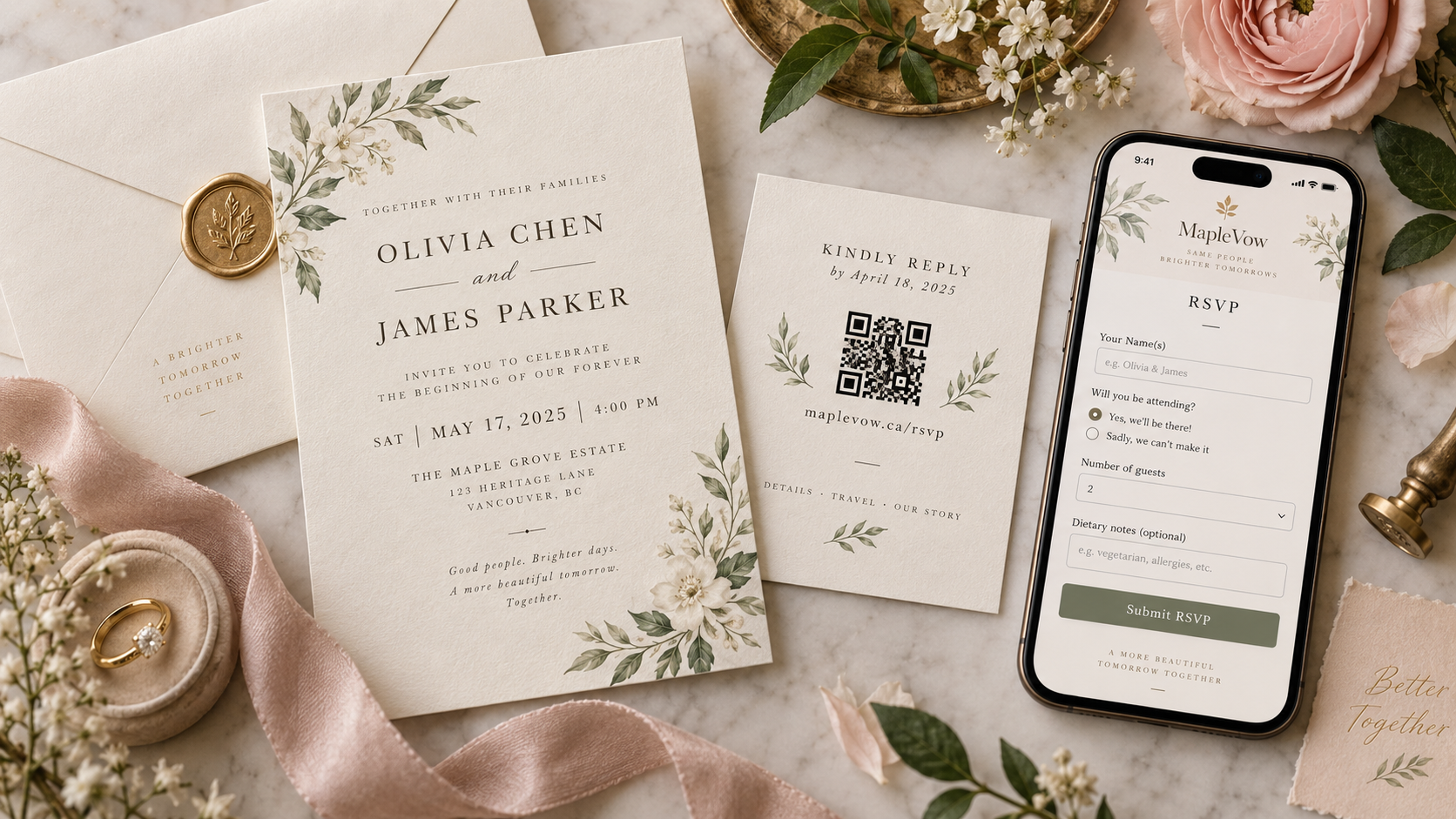
One of the most practical invitation setups is a hybrid wedding invitation: mail the paper invitation you actually want to hold in your hands, then direct guests to an online RSVP using a QR code and short web address.
The paper still does what paper does best. It arrives physically. It feels intentional. It can match your colours, typography and culture. It can become a keepsake.
The online RSVP does what paper is not especially good at. It collects answers instantly, separates individual guests in a household, records meal selections, handles plus-ones and multiple events, gives you live counts and makes it obvious who still has not replied.
For couples who love the experience of a mailed invitation but do not want to manage return cards and spreadsheets, the hybrid model is not a compromise. It is often the cleaner system.
What is a hybrid wedding invitation?
A hybrid invitation combines a physical invitation with a digital response or information experience.
A common setup looks like this:
Mailed invitation suite
↓
Small RSVP/details card with QR code + short URL
↓
Wedding website or online RSVP
↓
Guest submits attendance, meals, plus-one and other details
↓
Your guest list updates
↓
Pending guests can receive targeted reminders
↓
Confirmed guests feed into seating and final counts
With MapleVow, couples can print a QR code or share one link, while guests can RSVP from a browser without creating an account or installing an app. The RSVP can collect meals, dietary notes, plus-one details and custom questions, with responses connected to the guest list.
That makes the physical invitation the delivery experience and MapleVow the response system.
Why couples still choose paper
There is nothing inefficient about wanting a physical invitation. It serves a different purpose from the RSVP software.
A paper invitation can:
Create a stronger sense of occasion
Showcase custom illustration, letterpress, foil, embossing or cultural design
Be easier to share with family members in person
Become part of wedding photos and keepsake boxes
Feel more appropriate for couples who value formal stationery traditions
The problem is not paper itself. The friction often begins with the paper response workflow: reply cards, return envelopes, stamps, handwriting, missing meal selections and manual data entry.
You can keep the part of paper that you love without keeping every manual step that used to come with it.
Why move the RSVP online?
An online RSVP gives you structured answers immediately.
Instead of receiving a card that says “Alex & Sam — yes!” and then wondering which entrée belongs to which person, the form can collect the response per guest.
That can give you:
Real-time attendance totals
Individual meal selections
Plus-one names
Allergy and dietary notes
Responses to separate wedding events
High-chair or custom planning details
A clear list of guests who have not answered
It also removes one hidden piece of work: entering every paper response into a spreadsheet or wedding planning system after it arrives.
The best hybrid invitation suite
You do not need to squeeze the website and QR code onto the main formal invitation.
A clean three-piece suite can be:
1. The main invitation
Keep it focused on the invitation itself:
Emma Carter & James Chen
request the pleasure of your company
at their wedding celebration
Saturday, September 26, 2027
The Great Hall, Toronto
Use whatever formal, casual, religious, cultural or bilingual wording suits your wedding.
2. A details card
Use this for information that does not belong on the main invitation:
Ceremony/reception details
Dress code
Hotel information
Transportation
Adults-only wording where appropriate
Wedding website
3. A small RSVP card — without a return envelope
Instead of blanks for handwriting and a stamped return envelope, make the response action unmistakable:
Kindly RSVP by September 1
Scan the QR code to reply
[QR CODE]
maplevow.ca/s/emma-james
That card still feels like wedding stationery. It simply points to the faster response method.
Step 1: Build the guest list before you print
One of the biggest advantages of moving RSVP online is that you can define the invitation rules before the first envelope leaves your home.
Set up your guest list and decide:
Who is individually named
Which people belong to the same household
Who has an invited plus-one
Whether children are invited
Which guests are invited to which events
Meal choices
Which questions apply to which guests
With MapleVow, the guest list can drive invitations, RSVP responses, reminders, meals and seating. Starting there reduces the chance that your printed invitation says one thing while the RSVP form asks something different.
Before printing, test these scenarios
Create test cases that reflect your real guest list:
One single guest with no plus-one
One single guest with a plus-one
A couple where both names are known
A family with children
A guest invited to reception only
A guest invited to several events
A bilingual guest if you are using English/French mode
Walk through each RSVP as if you were that person.
Step 2: Finish the RSVP page before generating the printed instruction
Do not print a QR code that leads to a half-built experience.
Before approving the stationery, confirm that the live page contains:
Correct couple names
Wedding date and venue
RSVP deadline
Event list
Plus-one rules
Meal options
Dietary/allergy question
Any transportation or accessibility questions
English/French content if applicable
A clear confirmation after the RSVP is submitted
If you also use a wedding website, add the details that are likely to change or are too long for the invitation: parking, hotel information, maps, registry, FAQ and schedule.
Printed information should be stable. Online information can remain updateable.
Step 3: Decide where the QR code should lead
For most mailed invitation suites, you have two sensible choices.
Option A: Directly to RSVP
Best when the invitation already gives guests the essential details and you want the shortest path to a response.
Invitation → scan → RSVP
Option B: To the wedding website with an obvious RSVP button
Best when guests need to read travel, accommodation, schedule or venue information before responding.
Invitation → scan → wedding website → RSVP
MapleVow connects the wedding page and RSVP so both routes can still feed the same guest-management workflow.
If you use MapleVow's printable QR/shareable link approach, you can put the same public-facing QR instruction on each printed RSVP card rather than creating a completely separate print layout for every household.
Where a more personalized experience is appropriate, MapleVow also supports guest-specific links and private guest portals through digital communication.
Step 4: Write the RSVP card like an instruction, not a puzzle
The QR code should not be the only clue.
A strong RSVP insert answers four things immediately:
What do you want me to do? RSVP.
By when? A specific date.
How? Scan or visit the link.
What if I cannot scan? Type the short URL or contact the couple.
Formal wording
Kindly reply by September 1, 2027
Please scan the QR code or visit
maplevow.ca/s/emma-james
Warm and modern wording
We can't wait to celebrate with you.
Please RSVP by September 1.
Scan the code or visit maplevow.ca/s/emma-james
Very minimal wording
RSVP by September 1
[QR CODE]
maplevow.ca/s/emma-james
Bilingual Canadian wording
Please RSVP by September 1
Veuillez répondre avant le 1er septembre
[QR CODE]
Scan to reply / Scannez pour répondre
maplevow.ca/s/emma-james
Destination wedding wording
Please RSVP by May 1
Travel details and RSVP:
[QR CODE]
maplevow.ca/s/emma-james
Wording with a non-digital fallback
Please RSVP by September 1
Scan the code or visit our website.
If you prefer, call or text us at the number provided in your invitation details.
You do not need to apologize for using an online RSVP. Just make the process obvious.
Step 5: Put a short URL under the QR code
This is worth repeating because it solves several real-world problems.
A short URL helps a guest who:
Wants to respond from a laptop
Received a photo of the invitation by text
Is viewing the invitation on their own phone and cannot scan the screen easily
Has a camera that does not recognize the printed code
Simply prefers typing a web address
A QR code should reduce friction, not create a single point of failure.
Step 6: Print and test one complete invitation before ordering everything
Do not test only the QR image on your monitor.
Assemble one invitation exactly as guests will receive it. If the final suite includes vellum, ribbon, a pocket fold or a wax seal, use them in the test.
Then:
Scan the code from the finished card
Test with at least two different phones if possible
Make sure the code has not been reduced too far
Confirm the short URL is readable
Open the page using cellular data as well as Wi-Fi
Submit a test RSVP from beginning to end
Test plus-one, meal and decline paths
Test the French version if applicable
Ask someone who did not build the RSVP to try it without instructions
If that person understands what to do immediately, your guests probably will too.
Step 7: Check the weight and dimensions before mailing in Canada
Wedding invitation suites can become surprisingly thick after adding card stock, liners, vellum, ribbon or wax seals.
Canada Post's standard Lettermail category has specific dimensional and weight limits. Standard Lettermail can weigh up to 50 g, with a maximum thickness of 5 mm; larger or thicker pieces may fall into non-standard/oversize Lettermail, with different pricing.
As of Canada Post's March 23, 2026 consumer pricing, a domestic standard letter up to 30 g costs $1.44 for a single stamp or $1.24 per stamp when purchased in a booklet/coil/pane, while a 30–50 g standard letter costs $1.75.
Non-standard and oversize pieces cost more. Postal prices can change, so confirm the current rate before buying postage for the full invitation run.
The safest workflow is simple:
Bring one fully assembled invitation to Canada Post and have it weighed and measured before purchasing all of your postage.
That is especially important if you use unusually square cards, rigid embellishments or thick wax seals.
Step 8: Give paper invitations enough time to arrive
For domestic Lettermail, Canada Post currently estimates delivery at:
2 business days locally
3 business days within the same province
4 business days nationally
Those are delivery standards, not guarantees, and remote destinations may take longer.
Do not build your RSVP timeline around the assumption that every invitation will arrive exactly four days after you mail it.
If invitations are going from Toronto to guests across Ontario, Alberta, British Columbia, Québec and smaller communities, give yourself buffer. Weather, remote delivery and individual mail issues happen.
For a standard local wedding, many etiquette sources place invitation mailing around six to eight weeks before the wedding, while couples with significant travel or postal complexity may choose more time.
Your RSVP deadline should still leave a separate follow-up window before the venue needs final numbers.
Step 9: Address the envelopes cleanly
Canada Post's addressing guidance recommends clear, standardized formatting.
Canadian postal codes should be written in uppercase with a space in the middle and no hyphen, for example:
M5V 2T6
A return address is also useful in case an invitation cannot be delivered.
For the guest-facing name line, wedding etiquette and household structure are separate from postal automation. Use the names and titles that fit your relationship and the formality of your wedding, but make the actual street, municipality, province and postal code easy to read.
Step 10: Let the guest complete the whole response in one sitting
The payoff of the hybrid system comes after the scan.
A guest should be able to:
Identify their invitation.
Confirm who is attending.
Add an invited plus-one if applicable.
Respond to each event they are invited to.
Select meals.
Add dietary or accessibility information.
Submit.
Do not send them to one website for attendance, another form for meals and a third spreadsheet for the brunch.
The less fragmented the experience is, the less chasing you will do later.
Step 11: Follow up digitally — only with people who are still pending
This is where an online RSVP becomes much more useful than a paper return card.
After the invitations have arrived, you can see which guests still have not responded. Your reminder does not need to go to the entire guest list.
A good sequence might be:
About one week before the deadline
Send a gentle reminder to pending guests only.
Hi Alex! Just a quick reminder that our RSVP deadline is September 1. When you have a moment, you can reply here: [link]. We can't wait to celebrate with you!
After the deadline
Follow up personally with anyone still outstanding.
Do not assume that silence means no. It may mean the invitation was misplaced, the guest thought their partner responded, or they were waiting on travel arrangements.
MapleVow can send email and SMS reminders to guests whose RSVP remains pending and stop targeting someone after they respond.
Step 12: Use the answers instead of retyping them
Once the RSVP deadline passes, the information should become planning data.
Your confirmed guest list can feed:
Meal counts
Dietary notes
Plus-one names
Event attendance
Seating arrangements
Venue exports
Day-of guest tools
That is one of the biggest advantages of hybrid invitations: the beautiful paper piece never has to become a data-entry project.
What about older guests who do not want to use a QR code?
Do not design the system around a stereotype that every older guest dislikes technology. Many will scan a QR code without difficulty.
But do give everyone a fallback.
Options include:
The short URL printed below the code
A phone or text RSVP for a small number of guests
Having a family member help submit the response
Entering a response manually on your side after the guest calls you
You do not need to mail paper return cards to 150 people just because five people may prefer another method.
A hybrid workflow can be flexible at the edges without becoming two completely separate systems.
What if a guest loses the invitation?
This is another reason online RSVP is helpful.
If the paper invitation disappears under a pile of mail, send the guest their RSVP link by email or SMS. You are not asking them to wait for another card to arrive.
The physical invitation creates the moment. The digital link remains available when real life happens.
What if the wedding is bilingual?
Hybrid invitations are especially useful for English/French weddings because the paper can stay visually restrained while the online experience provides fuller bilingual information.
A small RSVP insert can read:
Please RSVP by September 1
Veuillez répondre avant le 1er septembre
Scan to RSVP / Scannez pour répondre
The linked MapleVow wedding page and RSVP can support English and Canadian French when bilingual mode is enabled.
You can then keep longer hotel instructions, parking notes, FAQs and schedule details online instead of trying to fit two complete language versions onto one small card.
What if you designed the invitation somewhere else?
Your stationery does not need to be designed inside the same platform that handles the RSVP.
You might work with:
A local stationer
A calligrapher
A graphic designer
Canva
Adobe Illustrator
Your venue/planner's preferred designer
For the mailed version, add the MapleVow QR code and short URL to your RSVP/details insert before printing.
MapleVow also supports uploading a finished JPG, PNG or WebP invitation design for the digital invitation experience, allowing you to carry the same visual identity into the online version rather than choosing a completely unrelated template.
That means a couple can have one coherent invitation design across paper and digital delivery.
Paper RSVP card vs QR RSVP: a practical comparison
Task | Traditional paper reply card | Paper invitation + online RSVP |
|---|---|---|
Guest sends response | Mails card back | Scans/taps and submits |
Return postage | Usually needed | Not needed for RSVP |
Meal selections | Handwritten/check box | Structured per guest |
Plus-one name | Often handwritten | Can be required when applicable |
Multi-event attendance | Can become crowded | Can be handled event by event |
Response tracking | Manual | Updates digitally |
Reminder list | Must reconcile manually | Pending guests identifiable |
Lost response | Requires follow-up | Guest can submit link again |
Data for seating/catering | Often re-entered | Already structured |
Keepsake invitation | Yes | Yes — the invitation is still paper |
The hybrid system does not eliminate paper. It eliminates the part of paper that creates unnecessary administrative work.
Common mistakes to avoid
Printing only the QR code with no explanation
Write Scan to RSVP, not just a code.
Forgetting the RSVP deadline
Guests need a date, not “at your earliest convenience.”
Making the URL too long to type
Use a short, readable wedding link.
Printing before the RSVP is tested
A working QR image is not the same as a working guest flow.
Mailing an overweight invitation with standard postage
Weigh the fully assembled piece first.
Sending reminders to everyone
Once someone has replied, stop asking them to RSVP.
Collecting answers in separate systems
The value of online RSVP drops quickly if meals are in one form, attendance in another and seating in a spreadsheet.
Putting every wedding detail on paper
Keep stable, ceremonial information on the invitation. Put changing or lengthy details online.
A complete hybrid invitation checklist
Before design
Guest list is organized by household.
Plus-one and children rules are decided.
Event invitations are defined.
RSVP deadline is based on venue/caterer deadlines.
Before print
RSVP page is live and tested.
QR code points to the intended page.
Short URL is printed as a fallback.
RSVP deadline is visible.
Bilingual wording is proofread if applicable.
One full-size printed proof scans correctly.
Before mailing
One fully assembled suite has been weighed/measured.
Current Canada Post postage has been confirmed.
Guest addresses and postal codes have been checked.
Return address is included.
Mailing date leaves buffer before the RSVP deadline.
After mailing
Test responses have been removed or clearly marked.
New RSVPs are monitored.
Pending guests receive a reminder near the deadline.
Non-responders are contacted after the deadline.
Final meals/counts are reviewed before sending to vendors.
Frequently Asked Questions
Is it acceptable to put a QR code on a wedding invitation?
Yes. If you want the main invitation to remain traditional, place the QR code on a matching RSVP or details card. The code is simply the response method.
Do I still need a paper RSVP card?
Not if you are collecting responses online. You can include a small RSVP instruction card without blanks, an envelope or return postage.
Should the QR code go directly to the RSVP form?
That is often the fastest experience.
If guests need travel, hotel or schedule information first, sending them to the wedding website with an obvious RSVP button can also work well.
Should I include both a QR code and a URL?
Yes. The QR code is convenient and the short URL is a useful fallback.
How early should I mail invitations in Canada?
Traditional guidance often lands around six to eight weeks before a local wedding, but travel needs and postal distance can justify sending earlier.
Canada Post's 2/3/4-business-day domestic standards are estimates rather than guarantees, so leave buffer.
Will a wax seal affect postage?
It can affect thickness, rigidity and machinability depending on the complete piece.
Because Canada Post pricing depends on the final size/weight category, bring a fully assembled sample to a postal counter before buying postage for all of your invitations.
Can guests RSVP without a MapleVow account?
Yes. MapleVow states that guests can open the RSVP link or scan the QR code and respond without installing an app or creating an account.
Can I keep my custom stationery design?
Yes. Use your own printed design and add the QR/link to an RSVP insert.
MapleVow also lets you upload a finished invitation image for the digital invitation experience if you want the online version to match.
Keep the invitation. Lose the spreadsheet.
A wedding invitation does not have to become less personal just because the response is online.
Mail the card that feels like you. Choose the paper, typography, illustration, language and details you want your guests to open. Then give them a clear, easy way to respond from the phone already in their hand.
MapleVow is built for that middle ground: paper invitation outside, connected RSVP system behind it.
Print the QR code or share the link, collect guest-specific answers, see responses arrive on one guest list and follow up only with the people who still owe you an answer.
You keep the tradition your guests can hold. You lose the part where you spend Sunday night deciphering handwriting and updating a spreadsheet.
References
Canada Post — Lettermail delivery standards
https://www.canadapost-postescanada.ca/cpc/en/support/articles/lettermail/delivery-standards.pageCanada Post — Lettermail size requirements
https://www.canadapost-postescanada.ca/cpc/en/support/articles/lettermail/size-requirements.pageCanada Post — Lettermail pricing
https://www.canadapost-postescanada.ca/cpc/en/support/articles/lettermail/pricing.pageCanada Post — Addressing guidelines
https://www.canadapost-postescanada.ca/cpc/en/support/articles/abcs-of-mailing/addressing.pageApple Support Canada — Scan a QR code with your iPhone camera
https://support.apple.com/en-ca/guide/iphone/iphe8bda8762/iosEmily Post Institute — Invitation Etiquette
https://emilypost.com/advice/invitation-etiquetteMapleVow — How MapleVow works
https://maplevow.ca/how-it-worksMapleVow — Online Wedding RSVP in Canada
https://maplevow.ca/wedding-rsvp-canadaMapleVow — Wedding RSVP Reminders
https://maplevow.ca/wedding-rsvp-remindersMapleVow — Designed Your Invitation Somewhere Else? Now You Can Use It on MapleVow
https://maplevow.ca/blog/use-your-own-invitation-design