Wedding seating chart maker

Your seating chart, drawn to scale.

Seat guests from your live guest list, then lay out the room or tent at its real size. MapleVow keeps every seat in step with RSVPs and meal choices, and hands your venue and caterer the lists they need.

Start for free
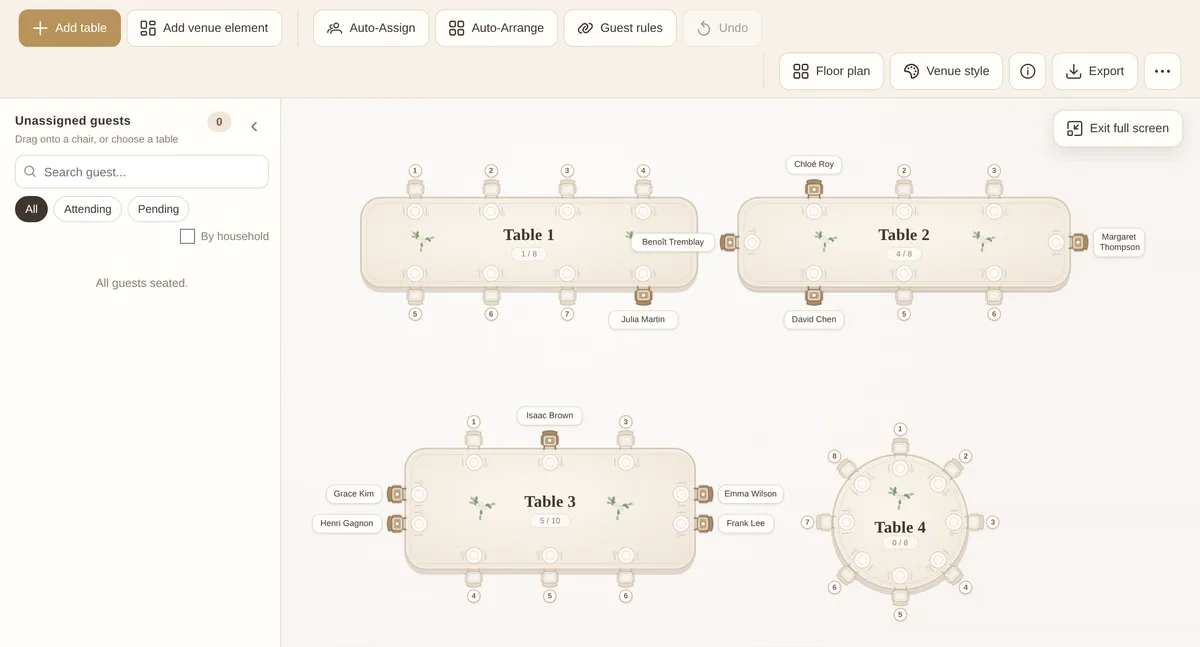
The MapleVow seating designer in full screen: rectangle tables with guests on the end seats and a round table, with zoom controls
The seating designer in full screen, with end seats on rectangle tables.
A floor plan export drawn to scale, with a metre ruler along the edges, guest names on the chairs and a spacing warning around a round table
Floor plan to scale, with ruler, guest names and spacing checks.

Seat guests from your live list

Tables pull from your guest list, so the chart always shows who has confirmed, who is pending and who declined.

  • Round, square and rectangle or head tables
  • End seats on rectangle tables: none, 1 or 2 per end
  • Meal and dietary notes on every guest
  • A separate chart for each event

Less manual work

Auto-assign fills tables for you and follows your seating rules. Drag guests between chairs whenever you change your mind.

  • Auto-assign and auto-arrange
  • Keep-together and keep-apart rules
  • Undo, Delete key and duplicate table
  • Clear chart to start over

Ready for the day

Export the plan and the lists your venue and caterer ask for, with meal totals that match your final counts.

  • PNG and PDF export, one page or detailed
  • CSV escort card list, table list and meal counts
  • Works alongside QR check-in

Everything in the seating designer

Built for real venues and tents, not just a grid of circles.

Seating chart questions

Does the seating chart use my real guest list?

Yes. Tables pull from your live guest list, so confirmed, pending, and declined guests stay accurate as RSVPs come in.

Can I plan to my venue’s exact measurements?

Yes. Set the room or tent size in feet or metres and every table, chair and venue object draws at its real size, with a ruler and spacing checks.

Can I plan a tent wedding?

Yes. Choose a frame or sailcloth tent, place the poles, and arrange tables around them. You can also upload the tent company’s layout and build on top of it.

Can AI build my chart from the venue’s layout?

Yes. Upload the layout PDF or image and AI finds the tables, seats and dance floor. You check the result before anything changes on your chart. It uses AI credits.

Can I see meal choices while seating guests?

Yes. Each guest card shows meal and dietary information, and you can download meal counts for your caterer.

Can I export or print the seating plan?

Yes. Export the chart as PNG or PDF, and download escort card, table and meal lists as CSV for your venue, caterer or coordinator.

Build your seating chart in minutes.

Add your guests, let RSVPs flow in, then arrange tables visually whenever you are ready.

Start for free
Matching wedding stationery

Matching seating board and place cards

Turn your finished chart into a seating board, place cards and table numbers that match your wedding website. Guest names and tables fill in from your chart.

Create matching stationery →