We use privacy-conscious Google Analytics only if you allow it. We never send guest names, emails, phone numbers, wedding names, or RSVP details. See our privacy policy.
Last verified November 7, 2026 · Features and prices can change · How we checked
The short answer
Choose RSVPify if you host many kinds of events and want detailed RSVP or registration forms with check-in, or a free form for up to 100 guests.
Choose MapleVow if you want your RSVP inside a full wedding website, with invitation, seating chart, budget and registry, guest wording ready in French and Chinese, and one payment per wedding in CAD.
MapleVow and RSVPify at a glance
What RSVPify’s own pages said when we checked on November 7, 2026, next to what MapleVow includes.
Category
MapleVow
RSVPify
Pricing & free plan
Free Promise plan for up to 100 guests. Paid plans from $29, a one-time payment per wedding in CAD.
Personal events: Free up to 100 guests, Gold US$10 a month (300 guests), Platinum US$15 a month (500 guests), or US$72 and US$108 a year. Business plans are priced separately.
Website customization
Offered:20 designs (9 on every plan), 19 fonts, 6 palettes or your own colours, and 17 sections to show, hide and reorder.
Offered:Event pages built around RSVPs and registration.
Invitations & RSVPs
Offered:Digital invitation and RSVP by link or QR code. Guests reply without an account or app.
Offered:Detailed RSVP and registration forms, with check-in.
Multiple events & guest groups
Offered:Separate RSVPs, guests and meals per event on every plan. Group guests by household and tags.
Offered:Multiple events in one RSVP.
Languages & localization
Offered:Guest pages, RSVP form and guest emails in English, Canadian French and Simplified Chinese.
Offered with limits, fees or a paid plan:Many interface languages; you supply your own translations.
Seating & meal planning
Offered:Seating chart with meal counts on every plan. Floor plans drawn to scale on Evermore.
Offered with limits, fees or a paid plan:Drag-and-drop seating chart builder; check which plan includes it.
Guest messages & reminders
Offered:Email invitations, confirmations and follow-ups. SMS invitations and reminders on every plan.
Offered with limits, fees or a paid plan:Confirmation emails and automated event reminders; check which plan includes them.
Registry & payment options
Offered:Universal registry: link any store, add your own gifts and show Interac e-Transfer details. Guests pay you directly, with no MapleVow fee.
Not confirmed on their public pages:Not listed on the pages we checked.
Photo sharing & guestbook
Offered with limits, fees or a paid plan:Guests upload photos by QR code in their browser, no app, on Evermore. Private voice and video guestbook on Evermore.
Not confirmed on their public pages:Not listed on the pages we checked.
Data hosting & privacy
Offered:Hosted on Canadian servers, with privacy practices designed with PIPEDA in mind. No ads or guest-list resale.
Not confirmed on their public pages:Not covered in our review. See RSVPify’s privacy policy.
Offered:
Offered
Offered with limits, fees or a paid plan:
Offered with limits, fees or a paid plan
Not confirmed on their public pages:
Not confirmed on their public pages
Price and billing
RSVPify
RSVPify’s personal event plans are Free (up to 100 guests), Gold at US$10 a month (300 guests) and Platinum at US$15 a month (500 guests). Paying yearly brings them to US$72 and US$108 a year. Business event plans are priced separately.
With MapleVow
Couple plans are one payment per wedding in CAD, with no subscription. The free Promise plan covers up to 100 guests and paid plans start at $29. Compare the total for the months you will be planning.
A wedding website, not only a form
RSVPify
RSVPify builds event pages around the RSVP or registration form, for weddings, parties and business events.
With MapleVow
Your RSVP sits inside a full wedding website with 20 designs, your story, schedule, travel details, FAQ and registry, plus a matching digital invitation.
Guests who read French or Chinese
RSVPify
RSVPify offers many interface languages, and you supply the translations for your own questions and wording.
With MapleVow
Guest pages, buttons, the RSVP form and guest emails come ready in English, Canadian French and Simplified Chinese. You add your own story and details in each language you use.
Seating and reminders
RSVPify
RSVPify has a drag-and-drop seating chart builder, confirmation emails and automated event reminders. Check which plan includes each one before you choose.
With MapleVow
A seating chart with meal counts on every plan, email invitations, confirmations and follow-ups, and SMS invitations and reminders on every plan.
Gifts and registry
RSVPify
We did not find registry or gift options on the RSVPify pages we checked. That does not mean there are none, so ask RSVPify if you need them.
With MapleVow
Link registries at any store, add your own gift ideas, and show Interac e-Transfer details for cash gifts, with no MapleVow fee.
What RSVPify does well
Detailed RSVP and registration forms
Check-in for many kinds of events
A free personal plan for up to 100 guests
RSVPify may suit you better if
You plan many kinds of events, not only a wedding
You need detailed registration forms and check-in
Your guest list fits the free plan and you only need an RSVP form
MapleVow may suit you better if
You want a full wedding website, not only an RSVP form
You prefer one payment in CAD over a monthly plan in USD
Some guests read French or Chinese
You want seating, budget and registry next to your RSVPs
See a real MapleVow wedding
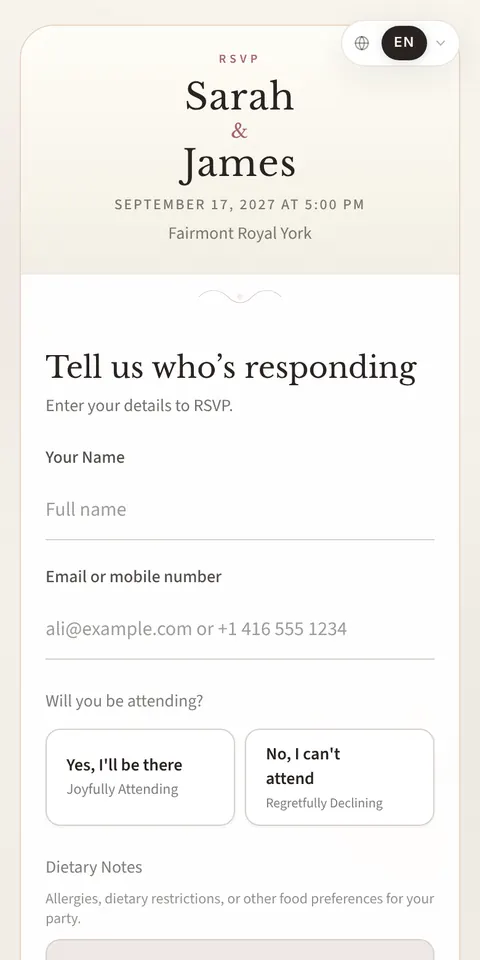
Click through the demo website and RSVP form of Sarah & James, a live MapleVow wedding.
For personal events, RSVPify is free up to 100 guests. Gold is US$10 a month for 300 guests and Platinum is US$15 a month for 500 guests, or US$72 and US$108 a year. MapleVow couple plans are one payment per wedding in CAD, from $29, with a free Promise plan for up to 100 guests.
Is RSVPify a wedding website builder?
RSVPify focuses on RSVP and registration pages for many kinds of events. MapleVow is built for weddings, so your RSVP form sits inside a full wedding website with a digital invitation, seating chart, budget and registry.
Can guests RSVP in French or Chinese?
RSVPify offers many interface languages, and you supply translations for your own wording. On MapleVow, guest pages, the RSVP form and emails come ready in English, Canadian French and Simplified Chinese; you add your own story in each language you use.
Can I move my RSVPify guest list to MapleVow?
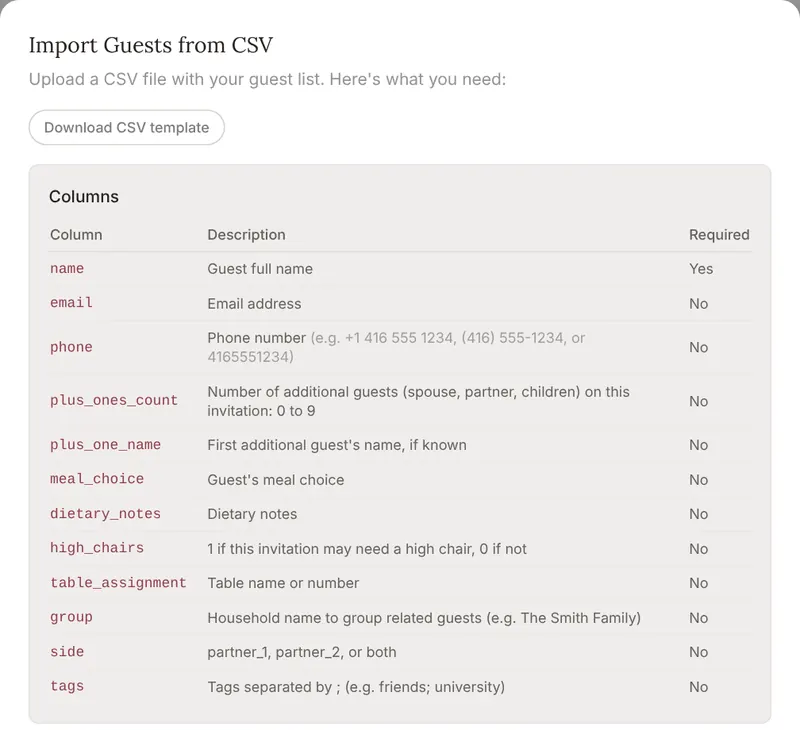
Yes, if you can export it from RSVPify as a spreadsheet. Save it as a CSV file, download MapleVow’s template to match the columns, and import it on the Guests page. RSVP answers and form questions are not moved automatically.
Sources for RSVPify
Last verified on their own website and help centre on November 7, 2026. “Not confirmed” means we could not find it on their public pages, not that it does not exist. Features and prices can change, so check their site before you decide.